On This Page
Set Up a JSON Web Token Message Using Shared Secret Key
Pairs
IMPORTANT
If you are using HTTP signature security for messaging, use this section to
migrate your system to support JSON Web Token messaging. By
March 2027
, all merchants using HTTP signature messaging must migrate to JSON
Web Token (JWT) messaging in order to support message-level encryption
(MLE).To set up JSON Web Token messaging using a
shared secret key pair
, you must
complete the tasks described in this section.Figure:
Set Up JSON Web Token a Messaging
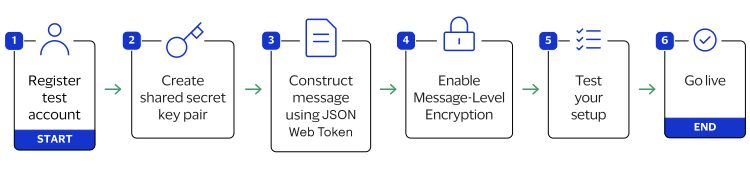
- Sign up for a test account. See Sign Up for a Test Account.
- Create a shared secret key pair. See Create a Shared Secret Key Pair.
- Construct a message using a JSON web token. See Construct Messages Using JSON Web Tokens.
- Enable message-level encryption (MLE) to encrypt all messages. See Enable Message-Level Encryption.
- Test your REST transaction messages. See Test Your Setup.
- Go live by transitioning your sandbox account into a production account. See Going Live.